在 “选择操作” 菜单中添加动作时 Maximo 应用程序套件,我们可能希望该操作仅对人员群组中的某些人可见。让我们来看看 MAIN 选项卡和 “列表” 视图中条件控制的实际实现。

在 “主选项卡” 中选择 “操作” 菜单的条件控制

对于此类有条件的用户界面控件,我们可以为操作创建签名选项,并向用户授予访问权限,条件是检查当前人员是否在必需/特定人员组中。
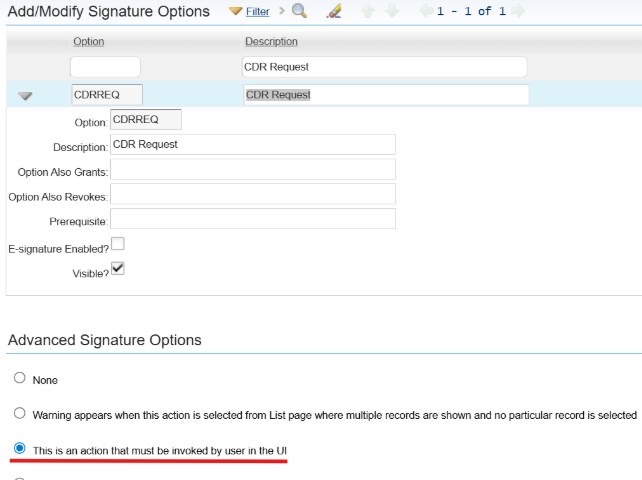
  1. 为操作创建签名选项,然后在 “高级签名选项” 中选择 “这是用户必须在用户界面中调用的操作”。

A screenshot of a computerAI-generated content may be incorrect.

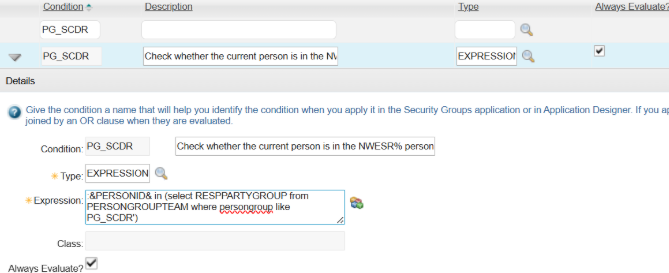
  1. 创建条件以检查当前人员是否在必需/特定人员组中。

A screenshot of a computerAI-generated content may be incorrect.

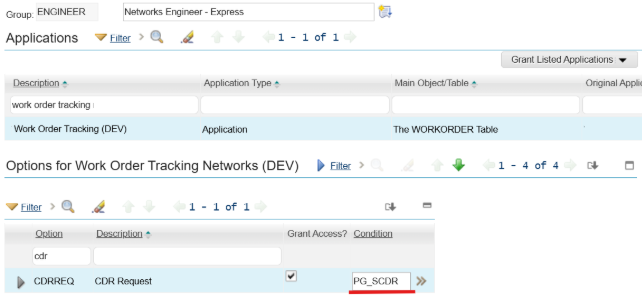
  1. 向具有新条件的用户授予安全组中的签名选项访问权限。


请注意,上述方法仅适用于单条记录的主选项卡(记录详细信息选项卡)。如果我们希望从应用程序列表选项卡(列表视图)中调用操作,在该选项卡中可以选择多条记录并同时执行操作,那么您会发现新的 “操作” 菜单对安全组中的所有用户仍然可见,不仅限于人员组中的某些人,即使条件已适用。
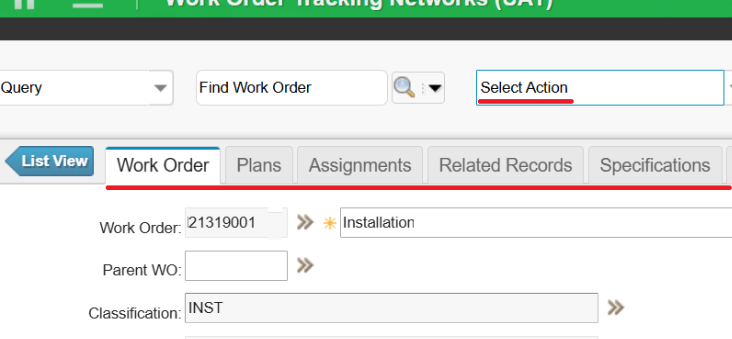

但这不是 Maximo 的错误,它按设计运行,因为:

  • 条件用户界面只能在记录的上下文中运行。在主选项卡(记录详细信息选项卡)上,数据库中有一条记录。
  • 在 LIST 选项卡(列表视图)上,您只在 resultsetBean 中,因此条件计算不一样,因此不会在 LIST 选项卡上对其进行评估,只能在记录详细信息选项卡上进行评估。

对列表视图中的 “选择操作” 菜单进行条件控制

那么,如何在 “列表” 视图的 “选择操作” 菜单上创建条件控件呢?以下是另一种方法。
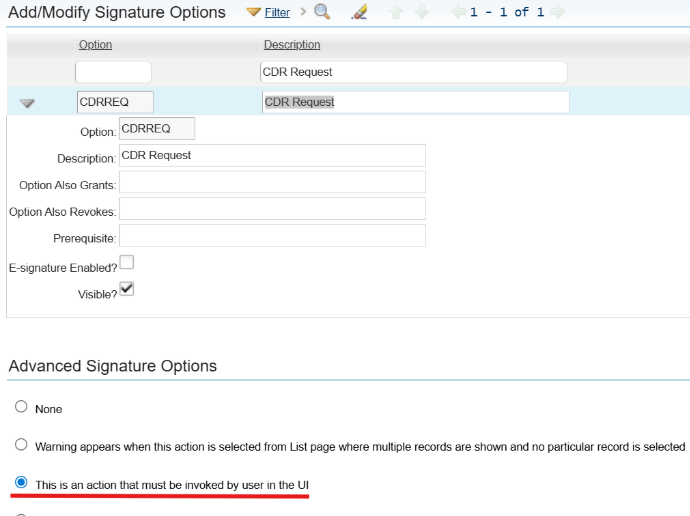
  1. 我们仍会为该操作创建签名选项,然后在 “高级签名选项” 中选择 “这是用户必须在用户界面中调用的操作”。

A screenshot of a computerAI-generated content may be incorrect.

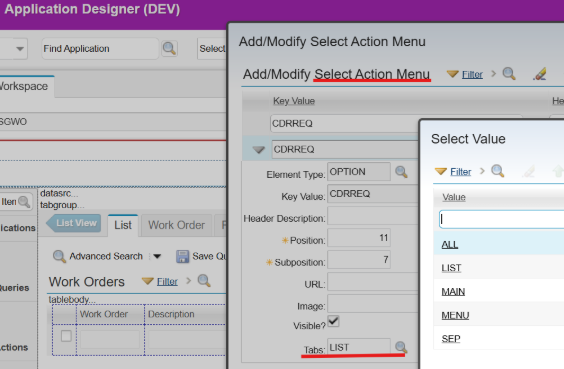
  1. 将 “签名选项” 添加到 “选择操作” 菜单并将 “选项卡” 指定为 “列表”。

A screenshot of a computerAI-generated content may be incorrect.

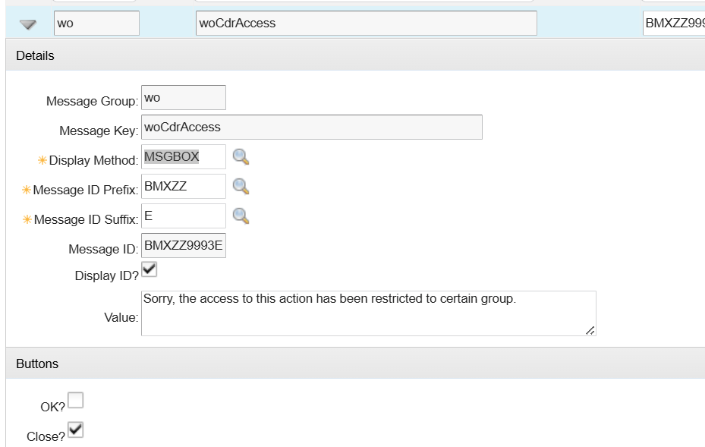
  1. 在数据库配置中创建错误消息。

A screenshot of a computerAI-generated content may be incorrect.

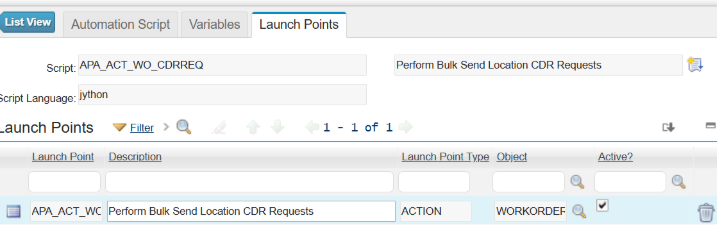
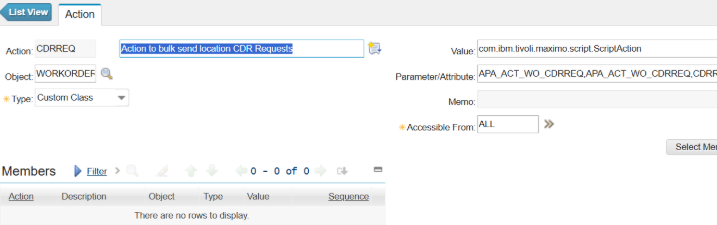
  1. 使用动作启动点创建自动化脚本,这将创建一个与签名选项同名的动作。

A screenshot of a computerAI-generated content may be incorrect.

  1. 在自动化脚本中,包括以下脚本,以便在当前人员不在所需的人员组中时显示错误消息。


from psdi.server import MXServer 
from psdi.security import UserInfo   

# Get the current user's PERSONID 
current_personid = mbo.getUserInfo().getPersonId() 
pgtSet = MXServer.getMXServer().getMboSet("PERSONGROUPTEAM", mbo.getUserInfo()) 
pgtSet.setWhere("persongroup = 'PG_SCDR' and RESPPARTYGROUP = '" + current_personid + "'") 
pgtSet.reset() 
# Error out if the current person not in Person Group PG_SCDR 
if pgtSet.isEmpty():     
	service.yncerror("wo", "woCdrAccess") 
pgtSet.cleanup() 
pgtSet.close() 
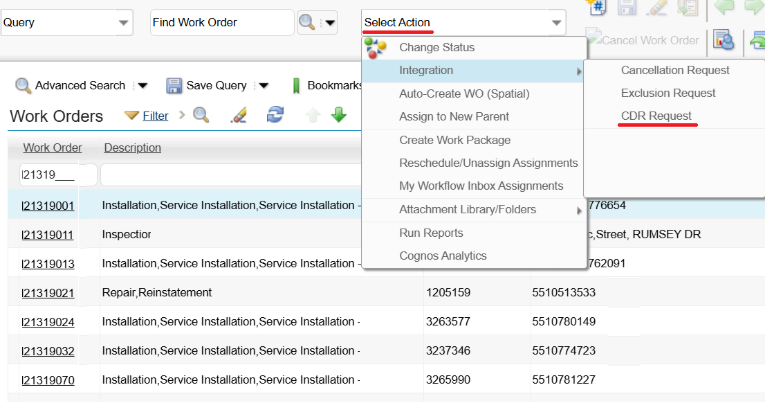
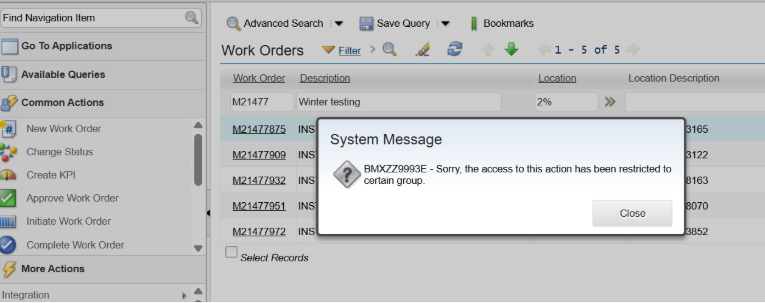
  1. 使用不在所需人员组中的用户进行测试;该操作在 “列表” 视图的 “选择操作” 中仍然可见,但是当用户尝试运行操作时会弹出错误消息。

A screenshot of a computerAI-generated content may be incorrect.

Unlock the Ultimate Guide to IBM Maximo Application Suite (MAS)

Discover everything you need to know to modernize your asset management strategy.

Inside, you’ll learn:

  • What’s new in IBM Maximo Application Suite 9.0
  • Key differences between Maximo 7.6 and MAS
  • How AppPoints and OpenShift change the game
  • Industry use cases across energy, manufacturing, and transportation
  • Step-by-step guidance for upgrading and migration readiness
Cover of 'The Ultimate Guide to MAS Maximo Application Suite' by Naviam featuring a man in a yellow construction helmet and safety vest holding a tablet.
×

ActiveG, BPD Zenith, EAM Swiss, InterPro Solutions, Lexco, Peacock Engineering, Projetech, Sharptree, and ZNAPZ have united under one brand: Naviam.

You’ll be redirected to the most relevant page at Naviam.io in a few seconds — or you can go now.

Read Press Release