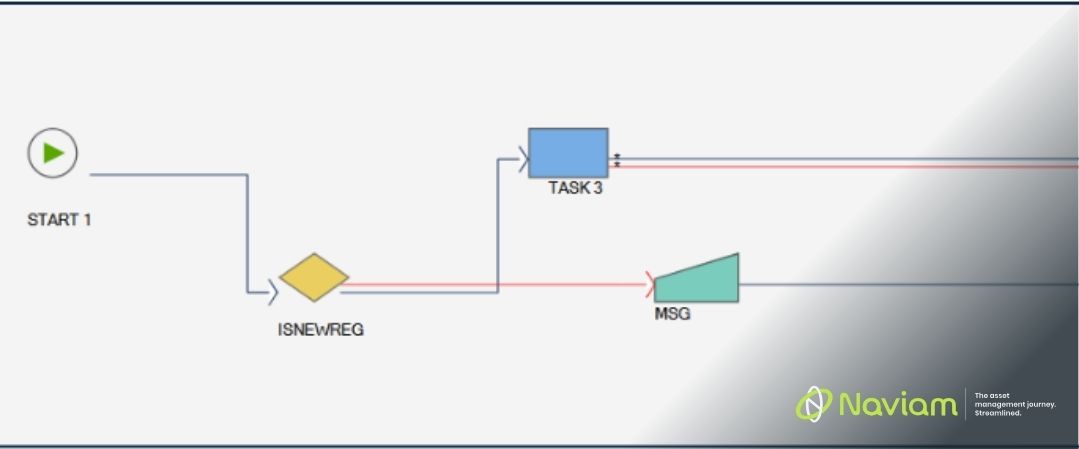
In many IBM Maximo Application Suite (MAS) implementations, workflows sit at the heart of business operations, driving approvals, enforcing process controls, and ensuring compliance. Yet, despite their importance, one of the most common challenges organisations face is the inability to export, share, review and showcase the process outside of Manage.
‍

This Maximo Workflow Export Tool addresses this gap directly, transforming opaque, system-bound configurations into clear, shareable, and fully documented process diagrams.

The Visibility Problem in Maximo Manage Workflows

Maximo Manage provides a powerful drag-and-drop Workflow Designer for building business processes. These workflows can range from simple approval chains to highly complex, multi-branch operational processes.
‍

However, the challenge lies in understanding and communicating those workflows:
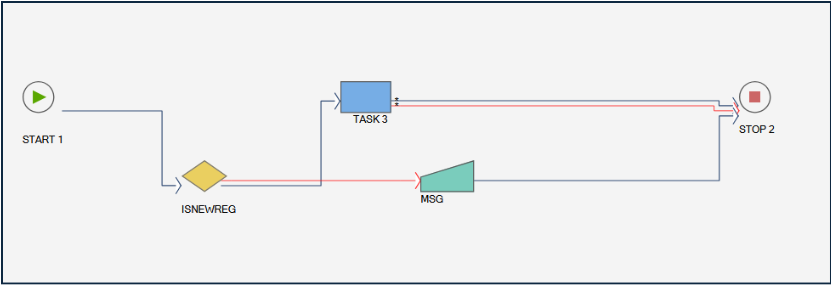
  • Key configuration details are hidden within each node
  • Reviewing a workflow requires manually clicking through each step
  • Documentation is often limited to static screenshots
  • Complex workflows are difficult to represent across multiple pages
    ‍
A diagram of a computerAI-generated content may be incorrect.

‍

This lack of visibility creates real business issues:

  • Slower troubleshooting and root cause analysis
  • Limited stakeholder understanding
  • Increased dependency on system experts
  • Poor documentation for audits and compliance

The Solution: Exporting Workflows into Usable Diagrams

This Maximo Workflow Export Tool introduces a simple but powerful concept: Extract workflow logic from Maximo and transform it into fully editable process diagrams. The solution consists of two complementary components:

Automation Script (Inside Manage)

  • Triggered directly within Maximo Manage
  • Generates a Draw.io XML representation of the workflow
  • Allows users to download the workflow structure instantly

Python Application (Outside Manage)

  • Takes workflow data tables as CSV input
  • Reconstructs the workflow logic externally
  • Produces the same diagram-ready Draw.io XML output
  • Can be used where direct access to Manage is not available
    ‍

Both approaches output a Draw.io-compatible XML file, designed for flexibility and ease of use.

From Hidden Logic to Visual Insight

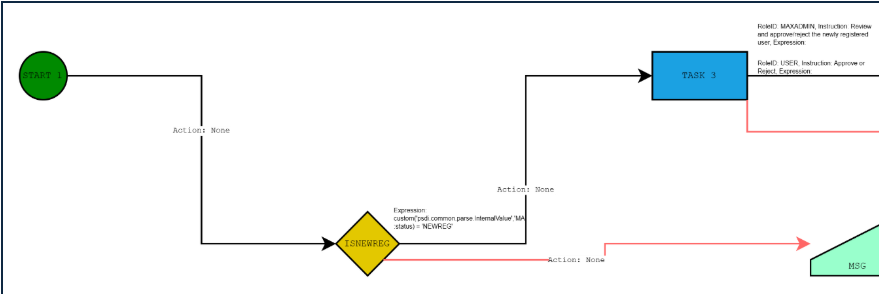
Once exported, the workflow can be opened in Draw.io and transformed into a fully visual process map.
‍

‍

‍

Unlike the native Maximo view, the exported diagram includes:

  • Node-level configuration details
  • Decision logic paths
  • Messages, tasks, and conditions
  • Supporting annotations alongside each step
    ‍

This turns a previously opaque workflow into a clear, structured, and interpretable business process.
‍

While the tool outputs Draw.io XML, organisations can take it further:

  • Export diagrams to PDF for documentation
  • Convert into Visio (via Draw.io) for enterprise-standard diagrams
  • Incorporate into functional and technical specifications

Practical Business Benefits

Improved Workflow Transparency

Business and technical stakeholders can now see exactly how processes behave, without needing to navigate Maximo.

Faster Troubleshooting and Analysis

Instead of manually inspecting nodes:

  • Entire workflows can be reviewed at once
  • Decision paths become immediately visible
  • Root causes can be identified more efficiently

Enhanced Documentation and Governance

The tool enables:

  • Accurate, up-to-date process documentation
  • Support for audits and compliance requirements
  • Clear traceability of workflow logic

Better Collaboration Across Teams

Visual diagrams allow:

  • Business users to understand workflows
  • Architects to validate process design
  • Developers to align on implementation logic
    ‍

This reduces misinterpretation and improves delivery quality.

Supporting Continuous Improvement

With clear visibility, organisations can:

  • Identify inefficiencies and bottlenecks
  • Simplify overly complex workflows
  • Optimise processes based on real insights

‍

‍

Workflows are often one of the most powerful, yet least visible, components of a Maximo implementation.
‍

The Maximo Workflow Export Tool changes that by:

  • Exposing hidden logic
  • Enabling clear visualisation
  • Supporting documentation and governance
  • Accelerating troubleshooting and optimisation
    ‍

For organisations looking to gain better control and insight into their Maximo processes, this capability offers a practical, high-impact way to unlock visibility and drive continuous improvement.

MORE Community Logo
Live from the MORE community

Your Maximo questions probably already have answers

See what Maximo users are asking, answering, and solving right now.

Unlock the Ultimate Guide to IBM Maximo Application Suite (MAS)

Discover everything you need to know to modernize your asset management strategy.

Inside, you’ll learn:

  • What’s new in IBM Maximo Application Suite 9.0
  • Key differences between Maximo 7.6 and MAS
  • How AppPoints and OpenShift change the game
  • Industry use cases across energy, manufacturing, and transportation
  • Step-by-step guidance for upgrading and migration readiness
Cover of 'The Ultimate Guide to MAS Maximo Application Suite' by Naviam featuring a man in a yellow construction helmet and safety vest holding a tablet.
×

ActiveG, BPD Zenith, Cohesive, EAM Swiss, InterPro Solutions, Lexco, Peacock Engineering, Projetech, Sharptree, and ZNAPZ have united under one brand: Naviam.

You’ll be redirected to the most relevant page at Naviam.io in a few seconds — or you can go now.

Read Press Release