

Naviam Mobile
A modern, configurable mobile experience built specifically for IBM Maximo®, Naviam Mobile gives technicians a faster, more intuitive way to execute work, complete inspections, and capture trusted field data—online or offline—without turning mobility into another major IT project.
Start simple. Adapt quickly. Scale without starting over.
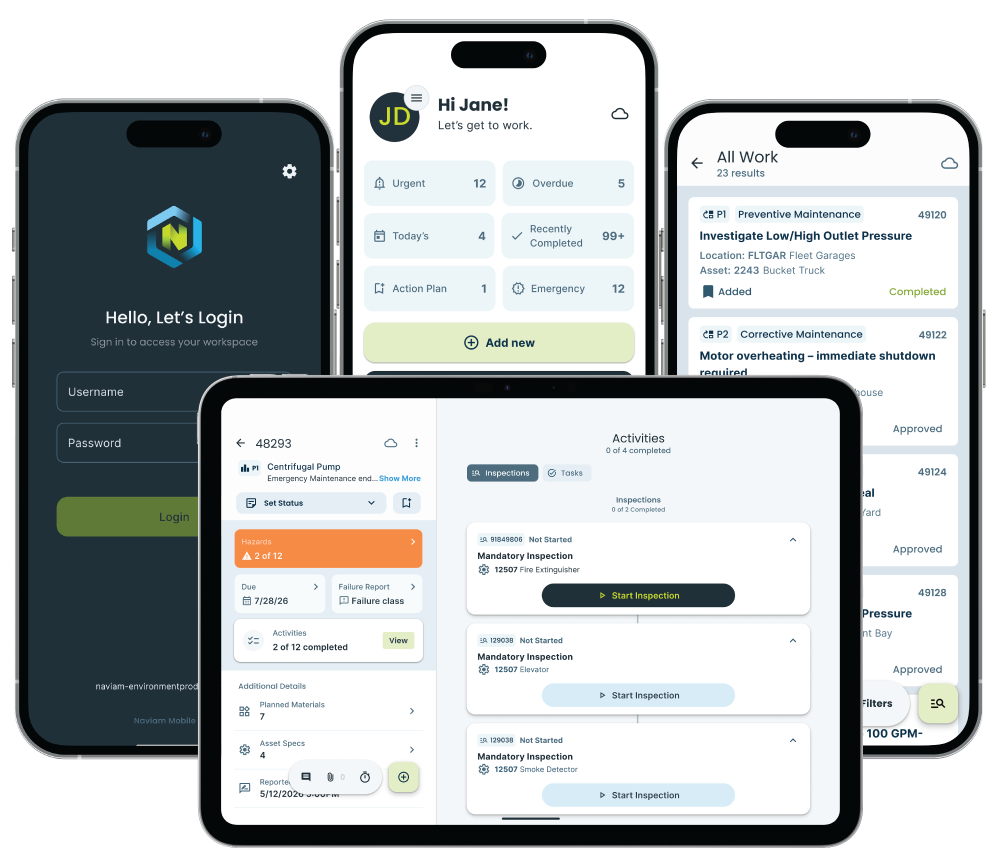


What is Naviam Mobile?
Naviam Mobile is a configurable mobile application built specifically for IBM Maximo Application Suite. It gives technicians, inspectors, inventory teams, and other field users a simpler way to access and update Maximo from mobile devices, including work execution, inspections, and offline field processes.
Naviam Mobile is designed to be simple to deploy, easy to adapt, and capable of expanding into more sophisticated field operations as an organization's needs evolve.
Our Point of View
Maximo mobility has earned a reputation—long implementations, extra infrastructure, applications that get harder to change every year. It doesn't have to work that way.
Naviam Mobile was built around a different idea: start simple, adapt quickly, and scale without starting over. The rest of this page is that idea, step by step.
Why Choose Naviam Mobile
Mobile should make Maximo easier—not add more complexity.
Mobility can improve technician productivity, data quality, and the speed at which field activity becomes visible. Getting there shouldn't require a lengthy implementation, layers of infrastructure, or an application that gets harder to maintain every time the business changes. Naviam Mobile takes a different approach.

Faster to adopt
Get field teams working with Maximo without the infrastructure and complexity traditionally associated with enterprise mobile deployments.

Easier to change
Configure the experience around your users and processes instead of rebuilding the application every time requirements change.

Built for field work
Give technicians a focused experience designed around completing work—not navigating every field and function available in Maximo.
Better data at the source
Capture inspections, readings, labor, notes, attachments, and work information while the activity is actually happening.

Online or offline
Keep assigned work moving when connectivity is limited and synchronize field activity back to Maximo when a connection is available.

Designed to grow
Begin with straightforward mobile processes and expand capabilities as your users, operations, and asset management maturity evolve.
01 - Start Simple
Download. Connect. Install.
Naviam Mobile connects directly with IBM Maximo Application Suite and deploys the required components into the Maximo environment—no separate middleware layer, no additional mobile application server.
For IT teams, that means a simpler architecture to manage. For operations, it means a faster path from mobile strategy to field adoption.
Less infrastructure. Less deployment complexity. More time focused on the work.
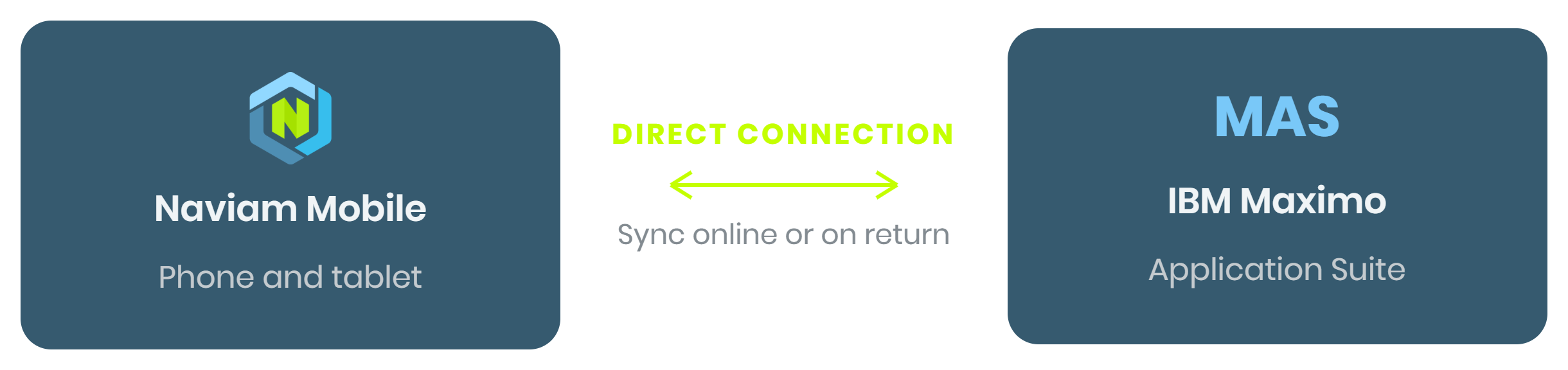
- No separate middleware layer
- No additional mobile application server
- Configuration held in Maximo, governed by Maximo security
02 - Adapt Quickly
Configure the experience. Don't rebuild the app.
Your maintenance processes will change. Your mobile application should be able to change with them.
Organizations can configure supported work categories, module visibility, business logic, and status behavior without maintaining a separate version of the core mobile application—so the field experience evolves as processes change, not on an app-release cycle.
Change the process without creating a maintenance problem.
Shaped by Configuration, not code
How work is organized and filtered
Work Views
Which modules users see, and in what order
Modules
Status transitions and supported business logic
Behavior
Role- and condition-based experiences
Roles
The information shown for different types of work
Fields
Delivered through Maximo—no new app version pushed to every device.
03 - Execute in the Field
Built for the realities of field work.
Field teams move between locations, lose connectivity, respond to urgent issues, and need the right information at the moment work happens. Naviam Mobile is designed to keep the field journey moving.
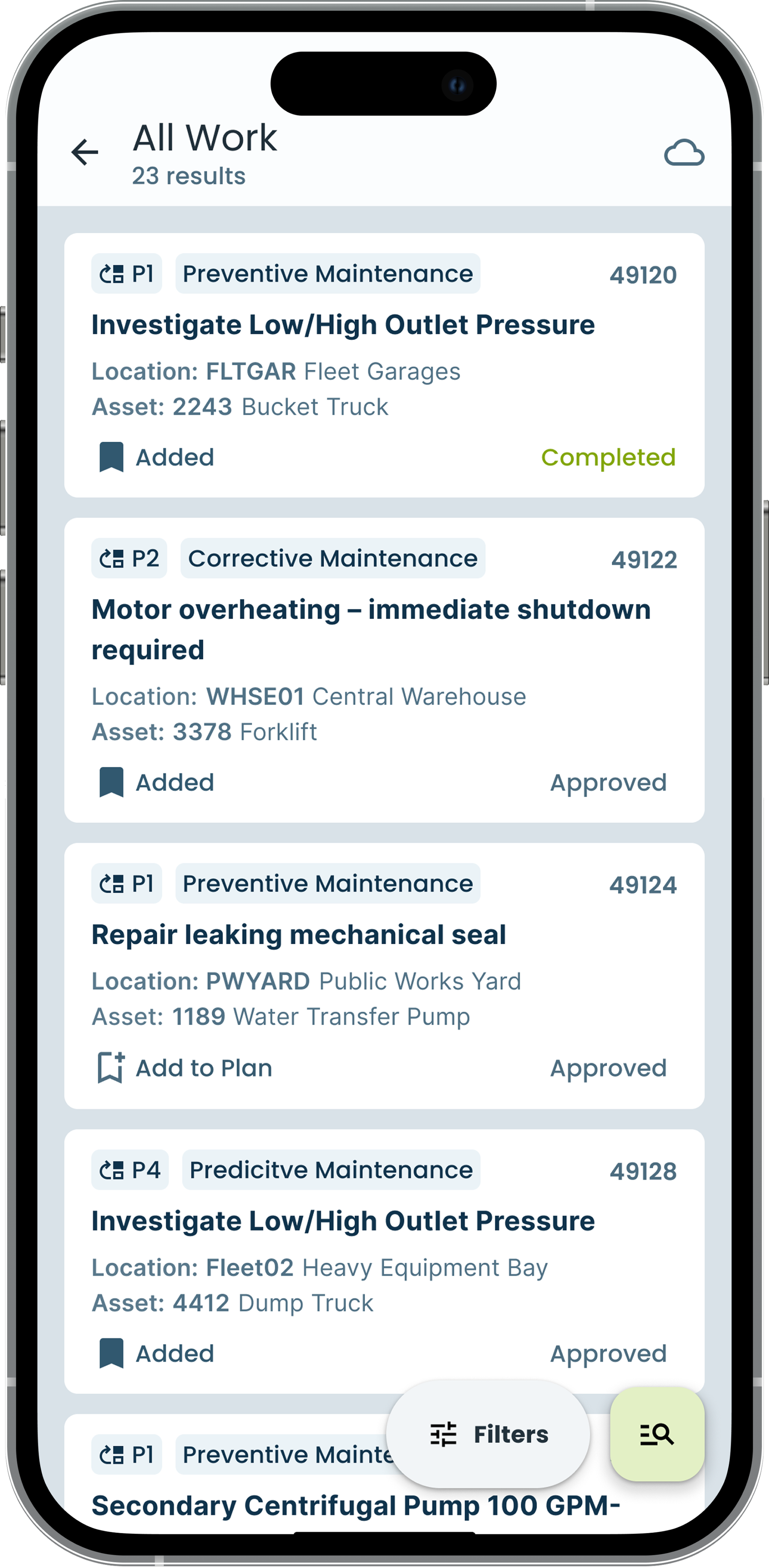
Mobile work execution for IBM Maximo
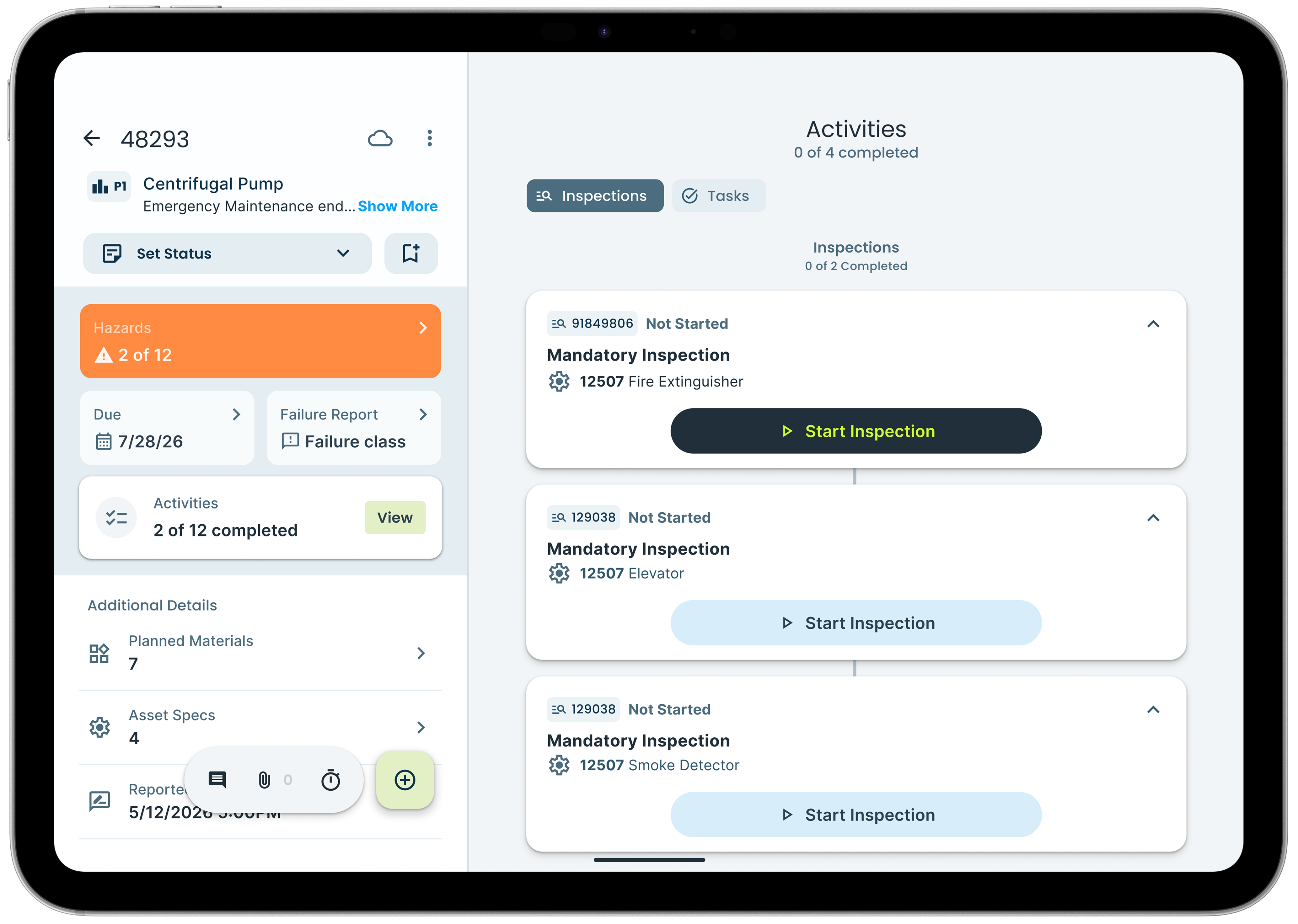
Move from assigned work to completed work with less friction. Technicians review work details, update status, record labor, add work logs and attachments, complete tasks, and capture information directly from the field.
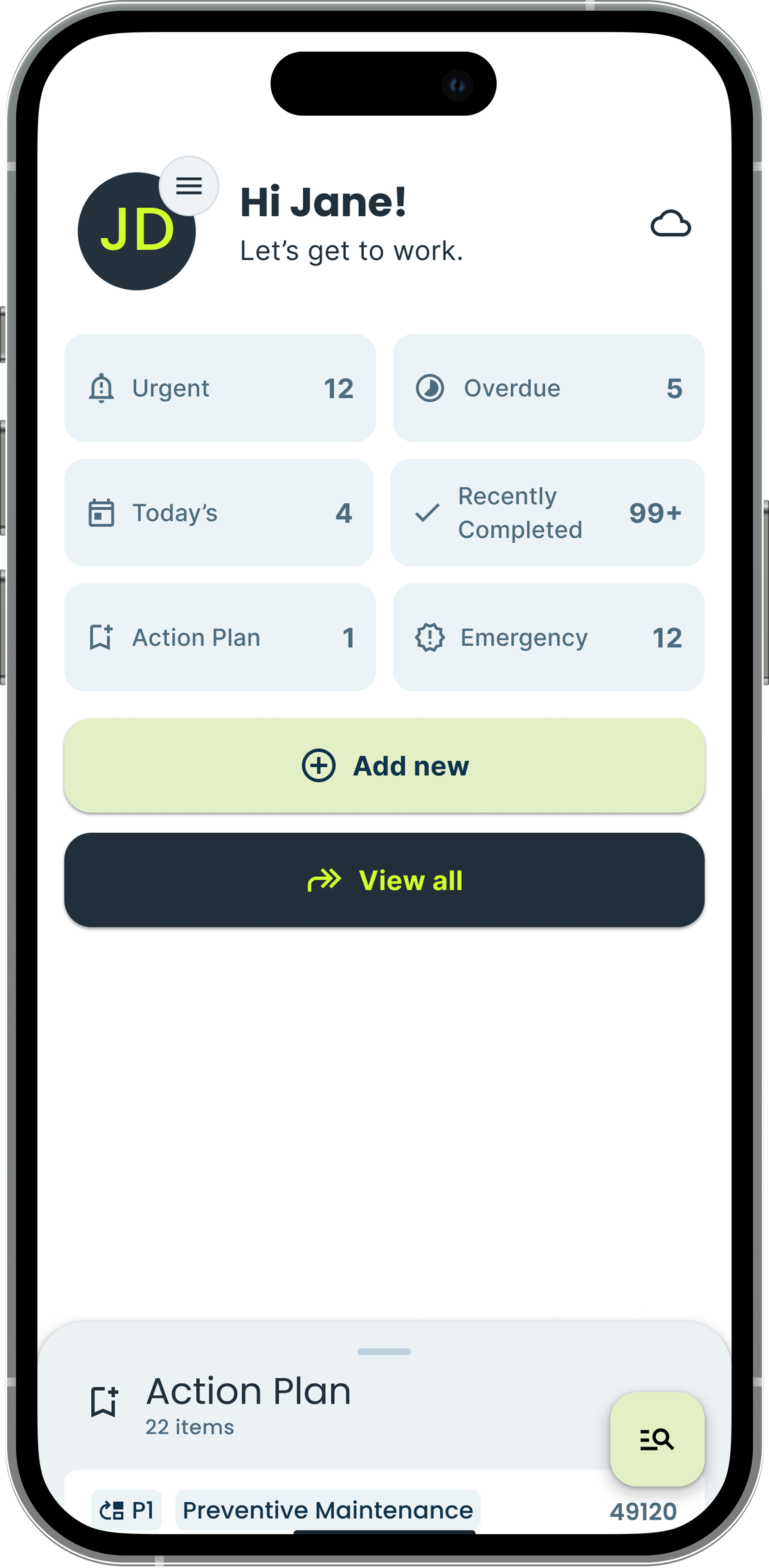
Work is organized into meaningful categories such as today's work, urgent work, emergency work, and overdue work—and technicians can build a personal Action Plan for the jobs that need their attention.
See the work. Prioritize it. Get it done.
Digital Maximo inspections
Make inspections part of the work—not paperwork after it. Guide technicians through required questions, conditional information, and validations. Track progress through longer forms and capture readings, photos, attachments, dates, times, and signatures.
Inspection activity flows back into Maximo, helping create a more complete and timely operational record. Standalone inspections against assets or locations are supported when work needs documenting outside a work order.
Better guidance for the technician. Better data for Maximo.

Offline work
Access assigned work and continue key field activities when reliable connectivity isn't available. Changes synchronize back to Maximo when connectivity returns.
Materials and inventory
Review planned materials and spare parts, search available inventory, select bins and quantities, and use device barcode scanning to identify items in the field.

Issue reporting and requests
Report issues and create service requests closer to the moment a problem is discovered, with the evidence needed to start the next process.

Flexible work assignment
Support multiple Maximo assignment strategies—labor, crews, ownership, work groups—so field users see the work relevant to them.
The right information at the point of work.
Depending on configuration and capability level, a work order can bring together everything the technician needs—so context never has to be hunted down.
The right information. The right user. The right moment.
Designed around the device in the technician's hand.
Naviam Mobile isn't a desktop experience made smaller. The interface adapts to phones and tablets—prioritizing essentials on small screens and using larger displays to show more of the work together.
The phone is also a camera, a barcode scanner and a source of location information. Naviam Mobile treats the device as part of the work process—so information is captured where the work happens, not transcribed back at a desk.
04 · Scale without starting over
Start simple. Scale without starting over.
Organizations shouldn't have to predict every mobile requirement before they begin. A tiered capability model aligns functionality with the needs of different user groups—and expands as processes become more sophisticated.
Different users need different levels of mobility—Naviam Mobile gives organizations one strategy for all of them. Feature availability varies by product tier, release, and implementation requirements.
Tier 1
Lite
Essential mobility for everyday field processes.
- Core work execution
- Maximo inspections
- Assigned work offline
- Work logs and attachments
- Service requests and issue reporting
- Basic labor entry
- Common field data capture
Tier 2
Standard
Expanded mobility for more involved field operations.
- Advanced work execution
- Inventory management
- Richer offline requirements
- Configurable field experiences
- GIS-enabled processes
Tier 3
Advanced
Specialized mobility for complex operational requirements.
- Deeper specialized workflows
- Sophisticated offline use cases
- Supervisory use cases
- Advanced GIS
- Complex operational environments
Naviam Mobile User Types
Lite
Standard
Advanced

One mobile experience for the people who keep operations moving.

Field technicians
Find assigned and priority work, complete tasks and inspections, record labor, and capture field information.

Inspection and reliability teams
Replace disconnected, paper-based processes with guided digital inspections and consistent field data capture.
Inventory and warehouse teams
Extend mobile processes into counting, material movement, and inventory operations as required.
Supervisors
Connect work planned in Maximo with activity in the field, with supervisory capabilities expanding over time.

GIS and asset teams
Bring work, asset, and location context closer together through mapping and Naviam GIS capabilities.
Connected with the Naviam ecosystem.
Mobile is strongest when it's part of a connected asset management strategy. Naviam Mobile works alongside the broader Naviam portfolio—from the field to the system to the strategy.

Naviam Cloud+
Provides the managed EAM foundation.
Naviam Mobile
Brings work, assets, inspections, inventory, and mapping into the field.

Naviam Planner
Helps connect work and resources.

Naviam GIS
Bring location and asset context into operational workflows.

Naviam DataStudio
Helps turn operational data into reporting and insight.
Naviam Cloud Dashboard
Provides visibility into system health and performance.

Naviam Elevate Suite
Extend what EAM teams can do.

Naviam Services & Support
Help customers keep moving toward long-term success.
Together, these capabilities support one larger goal: Simplifying the path to achieving ultimate value from all of your assets.
Frequently Asked Questions
What is Naviam Mobile?
Naviam Mobile is a unified field execution platform designed for Maximo users. It combines work execution, inspections, offline operations, inventory management, and mapping capabilities into a single mobile experience built for modern field teams.
How is Naviam Mobile different from traditional mobile solutions?
Naviam Mobile is designed around the real-world needs of field users, not just mobile access to enterprise systems. It provides scalable workflows for technicians, supervisors, inventory teams, and operations users within one unified platform.
Does Naviam Mobile support offline work?
Yes. Naviam Mobile is designed to support field operations in disconnected and remote environments. Users can access assigned work, inspections, labor reporting, attachments, and other operational data offline, with synchronization occurring once connectivity is restored.
Which versions of Maximo are supported?
Naviam Mobile supports all versions of the Maximo Application Suite, as well as Maximo 7.6.1.3.
What types of users is Naviam Mobile designed for?
Naviam Mobile supports a wide range of field and operational users, including:
- Field Technicians
- Maintenance Supervisors
- Inventory & Warehouse Teams
- Inspection & Reliability Teams
- GIS & Asset Operations Teams
The platform is designed to scale from lightweight field execution to advanced operational workflows.
What’s the difference between Lite, Standard, and Advanced users?
Naviam Mobile offers flexible user tiers designed to align with operational needs.
- Lite supports core work execution and inspections
- Standard expands into inventory management, advanced offline support, and mapping capabilities
- Advanced adds enterprise-scale operational workflows, supervision, and advanced GIS integrations
Organizations can start simple and scale over time within the same application.
Take Maximo into the field - seamlessly.
Take Maximo into the field - seamlessly.
Discover how Naviam Mobile helps organizations simplify field execution, improve operational visibility, and support every user, from lightweight mobile workflows to advanced field operations.
Naviam Mobile is not just mobile access.
It is the asset management journey, streamlined in the hands of the people doing the work.
.avif)
