
IBM MAS 9.2 and MCP: What Changes for Maximo Teams

I started working with the Model Context Protocol (MCP) before it was officially released in IBM Maximo Application Suite (MAS) 9.2. I even built my own MCP server for MAS, which I wrote about in a blog post series (The Problem with Talking to Maximo), to help connect AI agents with Maximo Manage. Since then, many people in the community have for Maximo teams.
Most conversations have focused on MCP coming to MAS 9.2, but here I want to explain how the MCP server works, what its architecture is, and how it lets AI agents safely work with Maximo. I’ll cover the main ideas and what they mean for teams who want to use MCP in their own Maximo setups.
If you have not read my blog series and don’t know what an MCP is, I’ll quickly recap.
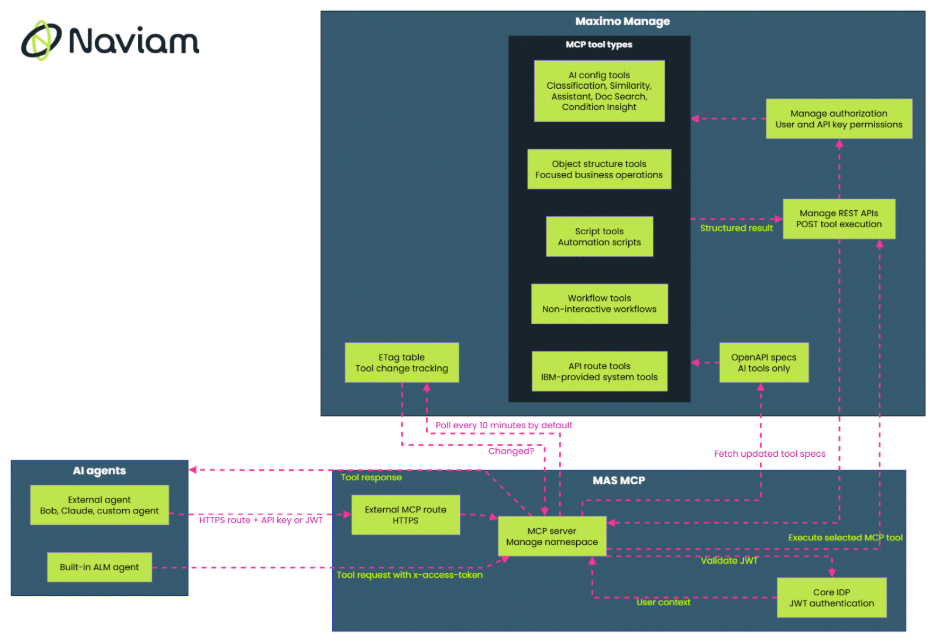
The MCP server sits between AI agents and Maximo Manage APIs. In MAS 9.2, it can serve the built-in Asset Lifecycle Management (ALM) agent - where ALM refers to the AI components deployed within the AI Service, as well as other AI-based solutions like Insights, Reliability, and more. ALM and related resources are the actual AI services that interact with Maximo through MCP, providing intelligent capabilities across the suite.
However, it is not limited to that built-in that built-in agent. It can also support external agents, including customer-owned agents or other agent frameworks, such as IBM Bob, Claude, and OpenAI, as long as they connect through the supported route and authentication model.
The simplest way to think about it is this: Manage remains the source of truth, and the MCP server is the agent-facing doorway into selected Manage capabilities.
Manage already exposes OpenAPI specifications. In MAS 9.2, the MCP server uses those specifications to understand which capabilities are available as AI tools. Manage keeps track of the tool definitions, and the MCP server polls Manage for updates. By default, that polling happens every 10 minutes, although the interval can be configured.
The polling process uses ETags. Manage keeps its own ETag for tool specification changes. The MCP server keeps an in-memory ETag. When those values differ, the MCP server refreshes its tool list and pulls the current OpenAPI specifications. That is how additions, updates and removals make their way into the agent-facing tool catalogue.
The tools also use structured input and output definitions. The presentation calls out Pydantic input and output objects, which give agents a stricter schema to follow (I’ve mentioned this in The Operations Layer: From Discovery to Action). That is not simply an implementation detail. Agents behave better when they receive a narrow, explicit contract rather than a large API surface area.
One of the better design choices here is that MCP does not create a separate security world alongside Maximo. Authentication and authorisation still flow through the normal MAS and Manage patterns.
For the built-in agent path, the UI sends an x-access-token JWT with the tool request. The MCP server sends that token to Core IDP for authentication, receives the user context and then propagates the user ID to Manage when it calls the tool. Manage still decides whether that user can perform the action.
That means a valid user is not automatically allowed to call every MCP tool. If the user should not be able to call a tool, or access a specific AI configuration, that restriction still applies when the request comes through MCP.
For external agents, MAS 9.2 supports authentication through Maximo API keys or JWT tokens. API keys are likely to be the common choice for integration-style cases where a single agent needs a consistent permission set. JWT tokens make more sense when the agent needs to act on behalf of different users.
Internal communication between MCP, Manage and Core uses MAS certificates. The point is not that MCP bypasses enterprise controls. It gives agents a way into Maximo while keeping the familiar controls in place.
The Bring Your Own Agent angle is one of the more interesting parts of this release.
Some customers will use IBM’s built-in ALM agent. Others already have their own agent investments, or may want a hybrid pattern where IBM agents and external agents both interact with Maximo. The MCP server supports that broader model - and that’s very exciting!
To connect an external agent, the customer needs two things: the externally exposed MCP route and an authentication method. The route is automatically exposed through OpenShift, and the agent sends either a Maximo API key or an x-access-token header depending on the authentication pattern.
That means Maximo capabilities can be made available to external agents through an industry-standard protocol instead of a one-off integration. For customers with existing AI platforms, this is likely to be one of the most practical parts of MAS 9.2. They can keep their agent strategy while still using Maximo as the governed system of record.
An interesting aspect of this design is that all MCP tools in Manage are REST APIs, but not all Maximo APIs are MCP tools.
That distinction is important. Maximo has a very large API surface. Giving all of it to an agent would be expensive, noisy and risky. The agent would have too much schema to process, too many possible paths and too many chances to choose poorly.
MCP tools are a more selective layer. They expose the capabilities that are meant to be used by agents, with a description, a schema and annotations that help the agent decide when and how to call them.
MAS 9.2 organises Manage MCP tools into five broad types.
AI configuration tools are based on activated AI configurations in Manage. The supported inference types from the installed AI Services include classification, similarity, assistant, doc search and condition insight.
The assistant capability is especially interesting because it can act as a bootstrap tool. It can take a natural-language request and infer what the REST API call should look like. In some cases, that flow is split into two tools: one to infer the API request and another to execute it. That split creates room for the agent to show the user what it is about to do before it takes the next step.
AI configuration tools use a whitelist maintained in the MAXAICFGTOOL table. Once a supported AI configuration is activated, it can become available as a tool automatically. That is different from several of the other tool types, where an explicit deployment step is needed.
Descriptions matter a lot here. The AI configuration description becomes the tool description, and the agent uses that content to decide whether the tool fits the user’s request. A vague description makes planning harder. A specific description gives the agent better guidance.
Object structures are powerful, but their schemas can be huge. A work order, asset, or location object structure may contain many operations and fields. Handing that entire schema to an agent is usually the wrong shape for the job. I ran into a lot of context-window issues myself while building my own MCP server.
OS tools address that by carving out narrower tools from the larger object structure model. Instead of exposing everything an asset object structure can do, an OS tool can expose a focused operation such as moving an asset or reporting downtime.
Automation scripts are one of the most common ways customers and partners extend Maximo. MAS 9.2 brings that extension pattern into the MCP model.
Script tools follow the same general approach as scripting for REST APIs. Literal script variables become the request schema. A response schema can be added when the script returns structured output, using the responseBody parameter. Only active scripts are deployed as MCP tools.
Workflow tools give teams a more graphical way to expose business flows to agents. This is useful in Maximo situations where important actions are already modelled as workflows rather than code.
The support is for non-interactive workflows only. That means workflows made up of nodes, condition nodes and actions. Workflows that depend on pop-up dialogues or interactive questions are not part of this first version.
The request schema is simple: an href element that identifies the record the workflow should run against. As with scripts and OS tools, that record may come from a previous assistant query.
Active and enabled workflows can be deployed as MCP tools, and their descriptions become part of how the agent understands when to use them.
The last tool type is API route tools. These are IBM-provided tools, mostly for admin or system-level capabilities rather than customer-defined business logic.
An example is the API schema tool. Future tools of this type might be developed by IBM as system-level tools, such as an agent that can answer questions about installed products, add-ons, industry solutions, languages, or upgrade information.
This category does not have a UI for customers to configure. Customers and partners already have scripting, workflows and object structure tools for their own extensions. API route tools are better understood as IBM-provided building blocks for capabilities that sit behind the scenes.
Across every tool type, the same pattern comes up: the tool description is the manual the agent reads.
That sounds simple, but it is probably where many implementations will succeed or struggle. An agent does not just need an endpoint. It needs to know what the tool is for, when to use it, what information it needs and what variations it supports.
Annotations are worth being deliberate about. Admins can mark a tool as read-only or destructive, and the agent can use that information before it decides what to do next. If a tool only retrieves data, the agent can treat it as low risk. If the tool changes a record, starts a workflow or runs a script, the agent has a good reason to pause and ask for confirmation. The annotation will not control every external agent, but it gives well-designed agents a clear warning before they act.
This is where Maximo experience still counts. The best MCP tool catalogues will not come from exposing everything. They will come from choosing the right operations, giving them tight schemas and writing descriptions that read like instructions from someone who understands the process.
The MCP server in MAS 9.2 is not only about adding AI to Maximo. It is about giving AI agents a controlled operating model inside Maximo.
Without MCP, a customer trying to connect an agent to Maximo has to decide how much of the API surface to expose, how to describe each action, how to handle authentication, how to keep tool definitions current and how to stop the agent from wandering into the wrong operation. MCP gives those concerns a more standard shape.
For teams already using AI configurations, the path to tool exposure can be automatic once the configuration is active and supported. For teams with mature Maximo customisations, scripts and workflows can become agent-callable tools without abandoning familiar extension patterns. For teams building their own agents, the external route and API key or JWT authentication model make Maximo easier to include in a wider AI architecture.
The result is a practical bridge between Maximo’s existing business logic and the new agent layer. It does not make governance less important. If anything, it makes good governance more visible. Tool descriptions, schemas, permissions and annotations become part of how the agent plans work.
That is the right direction. Enterprise agents need more than answers. They need bounded actions, clear contracts and access that respects the system of record. MAS 9.2’s MCP server gives Maximo teams a serious foundation for that kind of agentic work.

Discover everything you need to know to modernize your asset management strategy.
Inside, you’ll learn:

ActiveG, BPD Zenith, EAM Swiss, InterPro Solutions, Lexco, Peacock Engineering, Projetech, Sharptree, and ZNAPZ have united under one brand: Naviam.
You’ll be redirected to the most relevant page at Naviam.io in a few seconds — or you can
go now.


.avif)