
PM Forecasting: What It Tells You vs. What It Doesn’t
The Maximo Application Suite Manage application is such a powerful tool. There are multiple layers to unfold and at times it can be too much information to digest.
Here is where I hope PM Forecasting can help. This blog will provide you with how PM Forecasting can help you to understand some of the information around your PM generated Work Orders (WOs). I will be using MAS terminology in the blog, but know that this also is available in older version of Maximo as well.
PM Forecasting is a feature within the Preventative Maintenance application that will predict when future maintenance is due as well as the projected costs. It will do this without generating active WOs to build out a schedule of what PMs should generate when. The goal is to allow you to map out future workloads, plan budgets, evaluate available resources, and possibly more.
Before we go into more detail of what it tells you and what it doesn’t, let ‘s be sure you know how to generate the PM Forecast first.
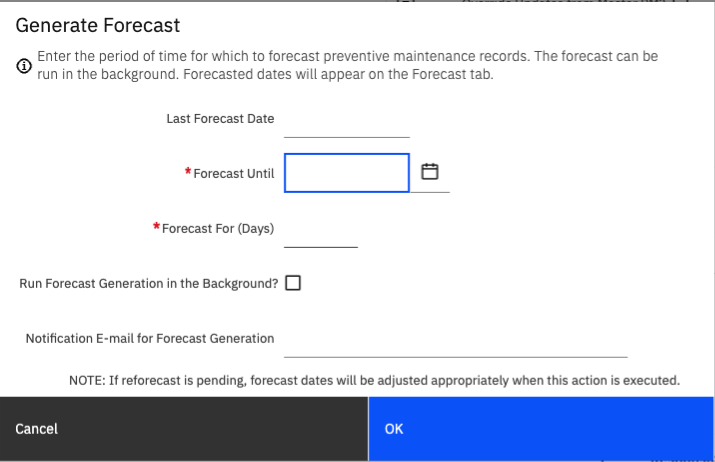
As stated above, this feature is with the Preventative Maintenance application in Manage. This can be done on one PM record or multiple PM records. For one record, I would just go to that specific record. If running for multiple, I would setup your query and view all the records in the list tab. Either way you do it, find the ‘Generate Forecast’ option in the More Actions menu on the left side of the screen.
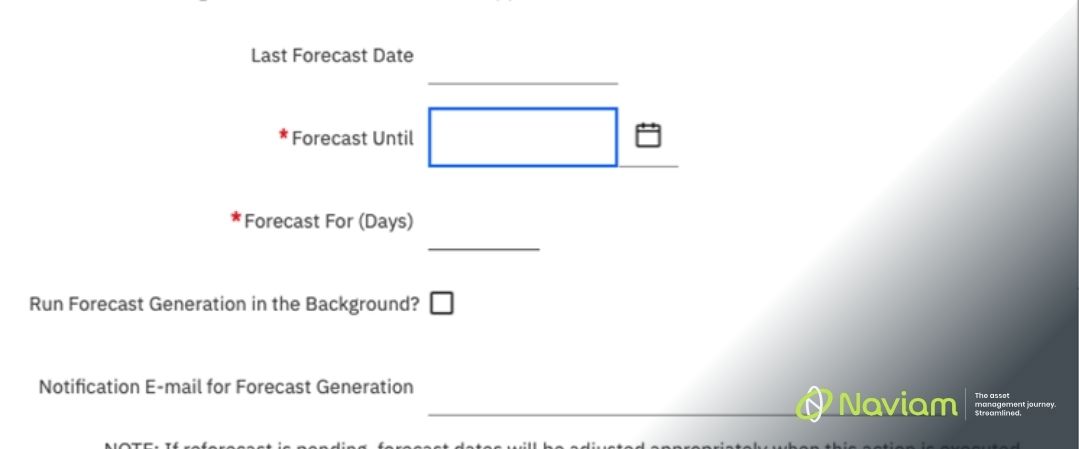
You will be prompted to fill in a few options. You need to fill in the Forecast Until OR the Forecast for (Days). You can tell Manage to forecast this PM from today until whatever day you select, or you can say you want to see the next 90 days.
Filling out one of these fields should automatically update the other with the correct value. You can choose to run the forecast in the background (I would do this if you are doing it for a very long time or if you plan on running it against multiple PMs). If you have decided to run it in the background, you can add your email to allow Manage to notify you when it has completed. Now, you should be able to go into the PM and navigate to the Forecast and Forecast Cost tabs and see what is there.
PM Forecasting is incredibly useful but often misunderstood. Relying on it too heavily can cause you to make bad planning decisions with good-looking data. Not having it can keep you asking the question, "What is due next month?" or "What should we budget for maintenance costs?"
Let’s get into what it does tell you and what it does not.
PM Forecasting tells you what should generate. It takes your PM Frequency, last completion date, next due date, and lead time, then projects it forward. Essentially, it says ‘if nothing changes, here is what Maximo expect to generate’. This give you an awesome view of PMs that should generate, timing of expected work, and job plans associated which should tell you labor and material estimates.
It is also a baseline for what is coming but not a commitment. It is saying what the system is designed to do. Not what will actually happen. It allows you to adjust staffing, pre-stage materials, and plan outages if needed. However, this does not mean it is a finalized plan.
One of the best things that PM Forecasting can do is show visibility into work patterns.
Are there too many PMs landing in the same week? You can work to change that.
Is there handful of PMs that are generating together that are similar work? You may not need those PMs or you need to work towards spreading them out.
You create a powerful use of PMs. Provide great maintenance to your assets. Most importantly avoid chaos of poor work distribution or high costs.
To start it does not reflect reality.
Forecasting is assuming PMs generate on time, and work gets completed on schedule. While we can make a great forecast, if your PMs are set to use PM last completion date and one is completed late, it pushes the forecast off.
For example, if a PM is due to complete March 1st but doesn’t get completed until March 20th, the forecast is thrown off. Remember that PM Forecast is what happens in an ideal world and what actually happens is a messy world.
Forecasting also is unable to consider operational constraints. Things like outages, emergencies, staff shortages, or even weather can affect what PMs you are able to accomplish. PM forecasting might show 10 PMs generating next week, but the question that needs to be asked is if it is possible to complete the 10 PMs. Forecasting can not answer that.
Finally the PM forecast does not account for execution quality. The forecast is assuming everything you listed on your PM is accurate: Job Plans, durations estimates, etc. However, if you have anything wrong on the PM the forecast is not able to tell that on it’s own. This could lead to incorrectly forecasted labor, or materials needed.
PM Forecasting is an extremely powerful tool that can help provide you with an excellent PM program. It looks very simple but has a lot of depth to it. Use it as the powerful tool that it is and review your PMs well. Do not let it mislead you and provide good-looking data with a bad PM Generation process. PM Forecasting tells you what Maximo expects to happen - not what your operation will actually deliver.

Discover everything you need to know to modernize your asset management strategy.
Inside, you’ll learn:


ActiveG, BPD Zenith, EAM Swiss, InterPro Solutions, Lexco, Peacock Engineering, Projetech, Sharptree, and ZNAPZ have united under one brand: Naviam.
You’ll be redirected to the most relevant page at Naviam.io in a few seconds — or you can
go now.



.avif)