
One Field, Many Behaviours: Dynamic Lookups and Free Text from a Single Maximo Field
Here's a scenario that comes up in Maximo implementations: you have a list of questions, maybe for a vendor quote, and each question needs a different type of answer. Some need a Yes/No dropdown. Some need a custom list of values. Some are just free text.
The instinct is often to create a separate field for each type: one field with a YORN domain, another with a custom domain, another plain text. That works, but it means your data model grows with every new question type, and your screen layout needs updating every time.
In this blog we walk through a different approach: a single VALUE field that dynamically changes its behaviour - free text, Yes/No lookup, Yes/No/NA lookup, or a custom domain - based on the question being answered. No screen layout changes. No new fields. Just two small automation scripts.
The context for this example is a questionnaire built on a custom Maximo object with three key fields:
The Core Idea: The VALUE field is configured in Application Designer as a plain textbox with no static domain attached. Whether it becomes a free-text field or a specific lookup is decided at runtime by the DATATYPE field, driven by two automation scripts.
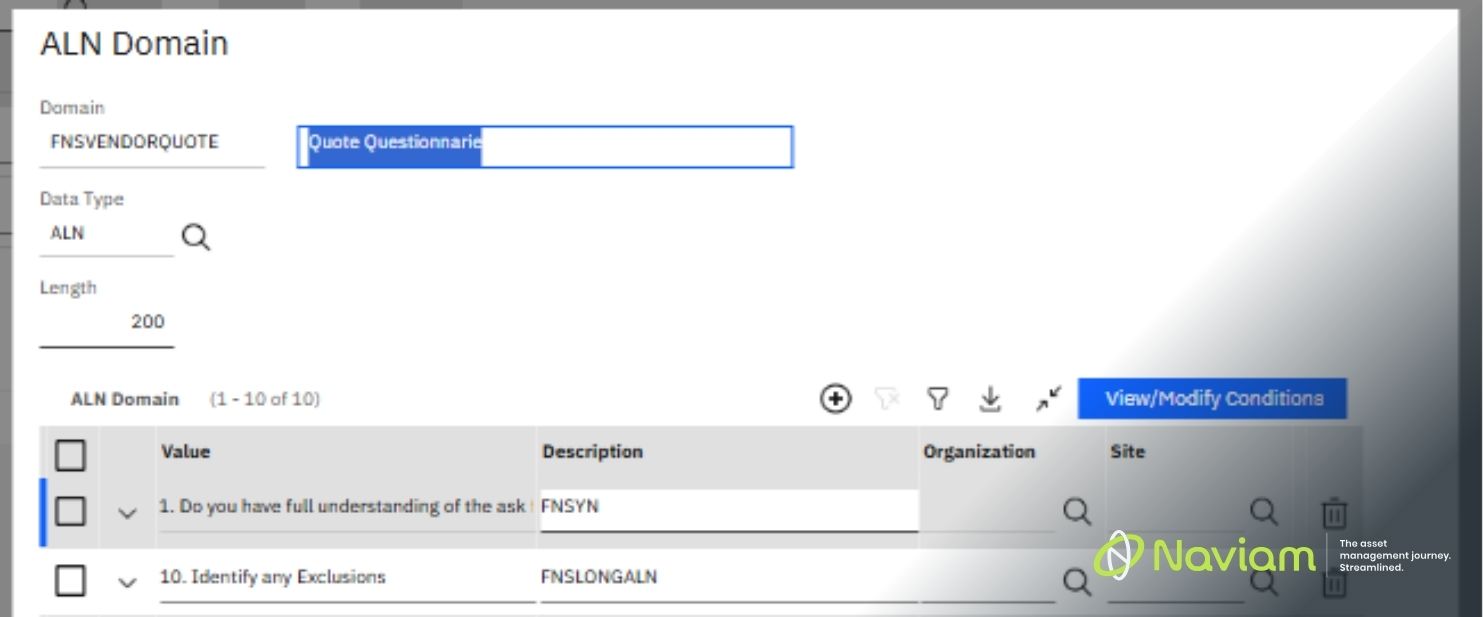
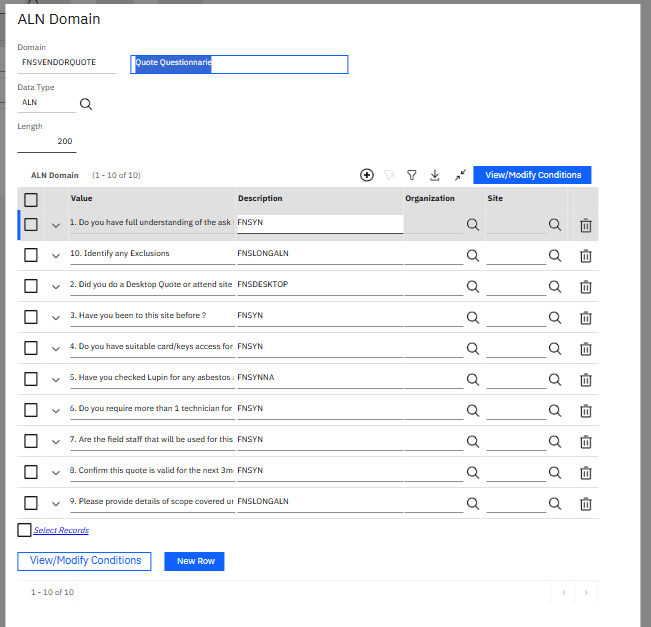
Questions are maintained in an ALN domain. Each entry uses two fields:
On a particular status change, the VALUE field of the ALN domain entry is copied into the QUESTION field of the custom object, and the DESCRIPTION field is copied into the DATATYPE field of the custom object. The exact trigger will depend on your requirement.
Here are the datatype codes and what each one means for the VALUE answer field:
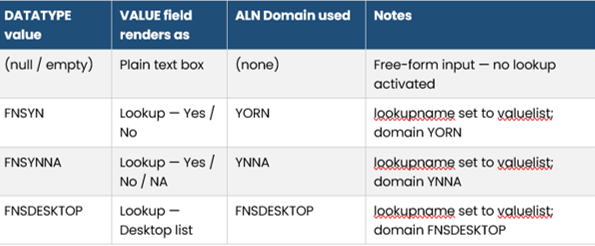
Why this is powerful: Adding a new free-text question or a question using an existing lookup type (FNSYN, FNSYNNA, FNSDESKTOP) requires nothing more than a new row in the ALN domain. Zero code changes, zero screen changes.
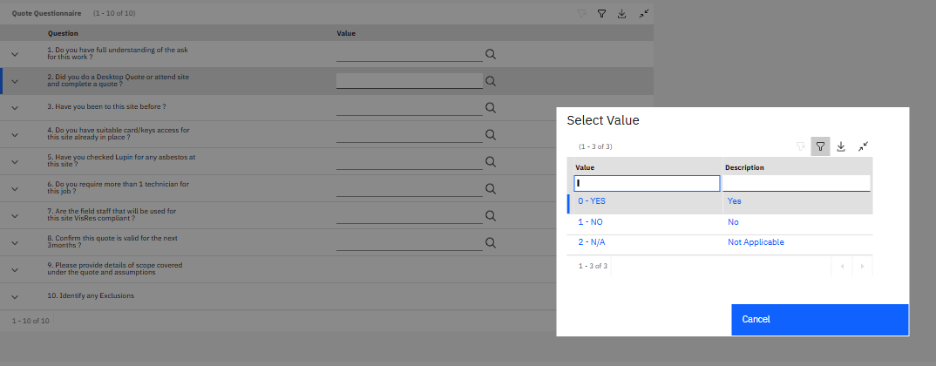
In Application Designer, the VALUE field is added to the screen as a standard textbox. Critically, no lookup is statically assigned to it.
This is essential. If a lookup were statically assigned, it would override the scripts. The field must be left as a blank canvas so the two automation scripts have full control at runtime.
Two Maximo automation scripts are attached to the VALUE attribute on the custom object. Together they handle the complete lookup lifecycle.
Script name: IBM.CUSTOMOBJECT.VALUE.INI
This script fires when the record loads. Its job is simple: if the DATATYPE is one of the recognised lookup types, it sets lookupname = "valuelist" to activate the lookup icon on the VALUE field. If the datatype is null or unrecognised, nothing is set and the field stays as plain free text.
# Script  : IBM.CUSTOMOBJECT.VALUE.INI
# Trigger : Attribute Initialization — VALUE attribute
# Purpose : If this question requires a lookup, activate the valuelist control.

if mbo.getString("DATATYPE") in ["FNSYN", "FNSDESKTOP", "FNSYNNA"]:
    lookupname = "valuelist"

# If DATATYPE is null or unrecognised, no lookupname is set —
# VALUE renders as a plain free-text box.
Script name: IBM.CUSTOMOBJECT.VALUE.RL
This script fires when the user clicks the lookup icon on the VALUE field. It reads DATATYPE and maps it to the correct ALN domain, telling Maximo which object to query, which WHERE clause to apply, and which keys to map back.
# Script  : IBM.CUSTOMOBJECT.VALUE.RL
# Trigger : Retrieve lookup — VALUE attribute
# Purpose : Map the DATATYPE to the correct ALN domain.

if mbo.getString("DATATYPE") == "FNSYN":
    relationObject = "ALNDOMAIN"
    relationWhere  = "domainid = 'YORN' and value=:value"
    listWhere      = "domainid = 'YORN'"
    srcKeys        = ["value"]
    targetKeys     = ["value"]

elif mbo.getString("DATATYPE") == "FNSYNNA":
    relationObject = "ALNDOMAIN"
    relationWhere  = "domainid = 'YNNA' and value=:value"
    listWhere      = "domainid = 'YNNA'"
    srcKeys        = ["value"]
    targetKeys     = ["value"]

elif mbo.getString("DATATYPE") == "FNSDESKTOP":
    relationObject = "ALNDOMAIN"
    relationWhere  = "domainid = 'FNSDESKTOP' and value=:value"
    listWhere      = "domainid = 'FNSDESKTOP'"
    srcKeys        = ["value"]
    targetKeys     = ["value"]
Pattern note: This example uses ALNDOMAIN for all lookups. For non-ALN domain lookups (numeric domains, table domains), the relationObject and key mapping will differ. The overall pattern remains the same - only the target changes.
Most new questions require zero code changes - just add a row to the ALN domain. The only exception is when you need a brand new lookup domain the scripts have not seen before. In that case:
Once done, any future question using that datatype will automatically pick up the correct lookup, no further changes needed.
Making a single field serve multiple purposes is a clean, maintainable design pattern. By using DATATYPE as a runtime control signal and keeping all logic in two focused scripts, the solution stays simple to understand and easy to extend.
The key takeaway: you do not need a new field for every new question type. You need a well-structured ALN domain, a control field, and two scripts that know what to do with it.

Discover everything you need to know to modernize your asset management strategy.
Inside, you’ll learn:


ActiveG, BPD Zenith, EAM Swiss, InterPro Solutions, Lexco, Peacock Engineering, Projetech, Sharptree, and ZNAPZ have united under one brand: Naviam.
You’ll be redirected to the most relevant page at Naviam.io in a few seconds — or you can
go now.


.avif)