
Tauchen Sie ein in MVI (On the Edge)
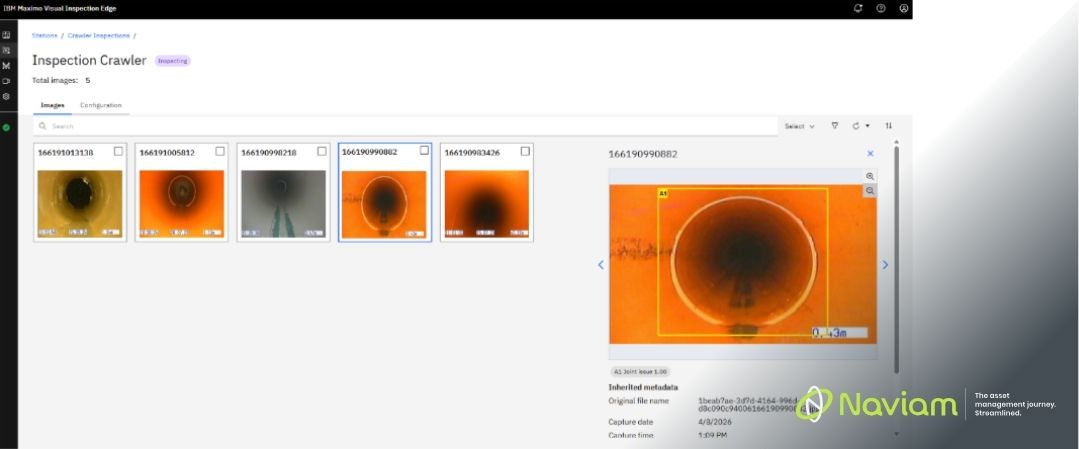
Seit dem Posten meines ersten Blogs über Maximo Visuelle Inspektion (MVI), ich war auf einer kleinen Reise, habe mich eingehender mit den Funktionen befasst, neue Anwendungsfälle untersucht und herausgefunden, wie vielseitig diese Technologie sein kann.
In diesem Beitrag möchte ich einen tieferen Einblick in das Angebot von MVI, die technischen Details und die verschiedenen Möglichkeiten geben, wie Sie es zur Lösung realer Probleme verwenden können. Egal, ob Sie neugierig sind, wie MVI unter der Haube funktioniert, ob Sie daran interessiert sind, es am Edge einzusetzen, oder einfach nur nach praktischen Beispielen suchen, ich werde die Erkenntnisse und Lektionen behandeln, die ich bisher gewonnen habe.
MVI kombiniert Bild- und Videoanalysen mit Deep-Learning-Modellen, um Klassifikation, Objekt- und Anomalieerkennung durchzuführen. Was MVI auszeichnet, ist seine Zugänglichkeit. Benutzer können Modelle mit minimalem technischem Fachwissen trainieren, wodurch fortschrittliche KI einem breiteren Spektrum von Organisationen zur Verfügung steht.
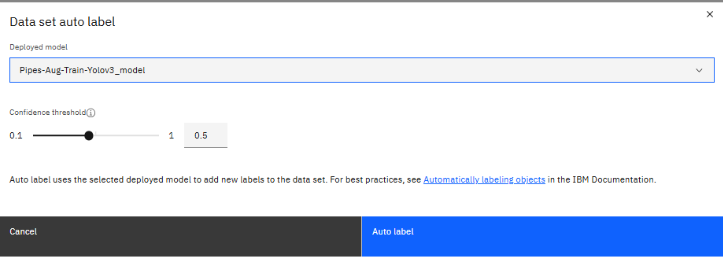
Um ein Modell mit MVI zu trainieren, benötigen Sie mindestens eine GPU (ja, das ist der teure Teil). Von dort aus ist der Vorgang unkompliziert:
Nach dem Training können diese Modelle auch exportiert werden. Ermöglicht die Verwendung von Modellen auf mehreren Systemen. Und wenn Sie Ihr Modell nicht mehr verfeinern müssen, können Sie es hier belassen und der teure Teil ist erledigt.
Der Prozess wird nach der Bereitstellung nicht beendet. Folgendes können Sie als Nächstes tun:
Als ich kürzlich an einer Maximo User Group teilnahm, fiel mir auf, dass es ein kleines Missverständnis darüber gab, wie MVI in der Industrie eingesetzt wird. Viele Menschen schienen MVI auf eine ganz bestimmte Art und Weise zu betrachten. Stellen Sie sich eine Kamera vor, die über einem Förderband an einer Produktionslinie befestigt ist und Teile in einer stabilen, unveränderlichen Umgebung analysiert. Und ja, das ist ein klassischer Anwendungsfall, aber er kratzt nur an der Oberfläche.
Was ich entdeckt habe ist das MVI ist weitaus dynamischer und vielseitiger als viele glauben. Es ist nicht auf statische Setups beschränkt. Zum Beispiel kann ein Techniker MVI für persönliche Inspektionen verwenden, indem er einfach ein Foto von einer Anlage macht, während er in einer Fabrik herumläuft. Oder Sie können Live-Übertragungen von Sicherheitskameras entlang der Bahngleise verwenden, um automatisch nach Hindernissen zu suchen. Am anderen Ende des Spektrums können Sie sogar Drohnen über einen Solarpark fliegen lassen, wobei MVI das Filmmaterial live überwacht oder es später im Rahmen einer Chargeninspektion analysiert.
Der allgemeine Kern? MVI passt sich Ihren Bedürfnissen an. Es geht nicht darum, Ihren Prozess an das Tool anzupassen — es geht darum, das Tool an Ihren Anwendungsfall anzupassen, egal ob stationär, mobil, live oder im Nachhinein.
Edge-Bereitstellung bedeutet, die KI-Modelle von MVI auf Geräten oder Servern auszuführen, die näher an den Anlagen liegen. Ein einfaches Beispiel ist eine Kamera, die direkt mit einem lokalen Edge-Server verbunden ist. Die Kamera streamt Daten mit minimaler Latenz an diesen Server, wo die Ausgabe kontinuierlich analysiert wird, sodass das Modell Aktionen auslösen kann.
Die Verwendung eines Edge-Servers ist überraschend einfach, sobald Sie einmal angefangen haben. Der erste Schritt besteht darin, ihn mithilfe eines API-Schlüssels mit Ihrem MVI-Trainingsserver zu verbinden. Diese Verbindung ist es, die alles freischaltet. Von dort aus können Sie die Modelle herunterladen, die Sie lokal auf dem Edge ausführen möchten.
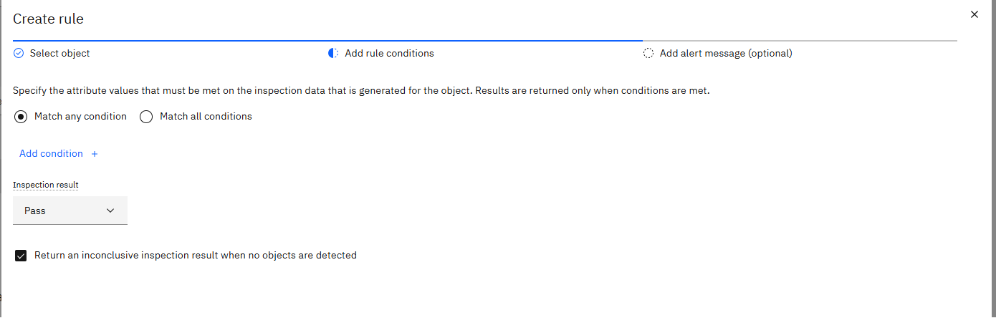
Sobald die Modelle eingerichtet sind, richten Sie Ihre Eingangsquellen ein. Sie können zwischen Bildordnern, Videoordnern oder Live-Kamera-Feeds wählen, je nachdem, wie Sie Ihre Daten überprüfen möchten. Ganz gleich, ob es sich um einen konstanten Livestream oder um einen Stapel von Bildern und Videos handelt, der Edge-Server verarbeitet alles sauber und effizient.

Als Nächstes erstellen Sie eine Station. Stellen Sie sich das als logische Gruppierung für Ihre Inspektionen vor, bei der die zugehörigen Ergebnisse an einem Ort zusammengeführt werden. Innerhalb einer Station definieren Sie dann einzelne Inspektionen. Bei jeder Inspektion können Sie entscheiden, welches Modell Sie verwenden möchten, wie es sich verhalten soll und was sie auslöst, unabhängig davon, ob dies nach einem Zeitplan erfolgt oder durch eine MQTT-Nachricht gesteuert wird.
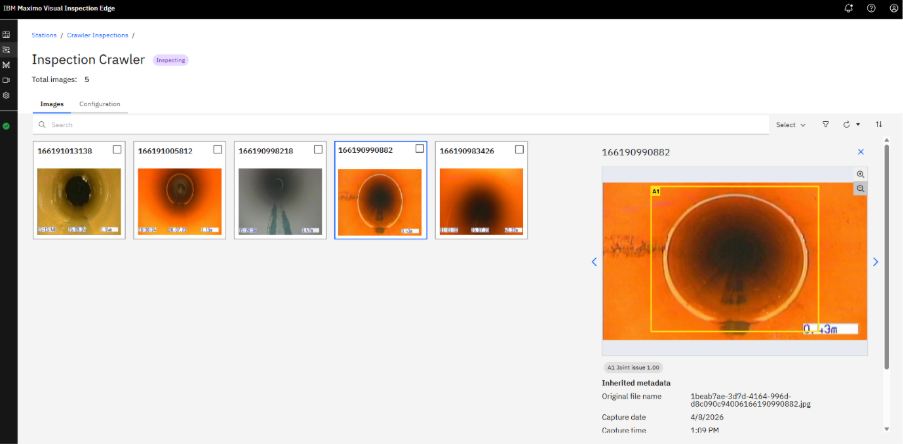
Schließlich läuft alles im Armaturenbrett zusammen. Von hier aus können Sie alle Ihre Inspektionen auf einen Blick sehen und sofort deren aktuellen Status nachvollziehen. Sie können nachverfolgen, was bearbeitet wurde, die Ergebnisse überprüfen, sobald sie eintreffen, und schnell erkennen, was Ihrer Aufmerksamkeit bedarf.
Ein Solarpark setzt Drohnen ein, die mit Edge-KI ausgestattet sind, um Paneele zu inspizieren. Die Drohnen analysieren das Filmmaterial in Echtzeit, melden beschädigte Paneele und senden nur umsetzbare Warnmeldungen an das zentrale Maximo-System. Techniker vor Ort erhalten gezielte Arbeitsaufträge, wodurch der Zeitaufwand für manuelle Inspektionen minimiert und die Betriebszeit der Anlagen maximiert wird.
Eines der großartigen Dinge bei der Edge-Bereitstellung ist die Flexibilität. Die Server oder Geräte, auf denen die Modelle ausgeführt werden, können je nach Anwendungsfall und den Anforderungen des Modells variieren. Ich habe kürzlich mit Naviam an der UK&I MUG teilgenommen. Dort haben wir eine Demo gesehen, in der IBM einen Edge-Server auf einer fast 15 Jahre alten Hardware ohne GPU und nur 16 GB RAM laufen ließ.
Es gilt immer noch die Regel: Sie bekommen, wofür Sie bezahlen. Ein neuerer Server bietet Ihnen eine bessere Geschwindigkeit und Zuverlässigkeit, aber selbst bescheidene Hardware kann bestimmte Arbeitslasten bewältigen, ohne das Budget zu sprengen.
Die Edge-Funktionen von MVI stellen einen Sprung nach vorne in der Vermögensverwaltung dar und liefern in Echtzeit umsetzbare Erkenntnisse dort, wo sie am wichtigsten sind. Es ermöglicht Teams, Modelle zu trainieren und einzusetzen, die wenig bis gar keine wirkliche Erfahrung mit Vision-Modellen haben. Im nächsten Blog werde ich näher darauf eingehen Naviams Lösung, bei der wir die Lücke schließen, indem wir MVI-Inspektionen (sowohl am Edge als auch in der Cloud) direkt in MAS Manage integrieren.

Erfahren Sie alles, was Sie wissen müssen, um Ihre Vermögensverwaltungsstrategie zu modernisieren.
Darin erfährst du:


ActiveG, BPD Zenith, EAM Swiss, InterPro Solutions, Lexco, Peacock Engineering, Projetech, Sharptree, and ZNAPZ have united under one brand: Naviam.
You’ll be redirected to the most relevant page at Naviam.io in a few seconds — or you can
go now.

.avif)